
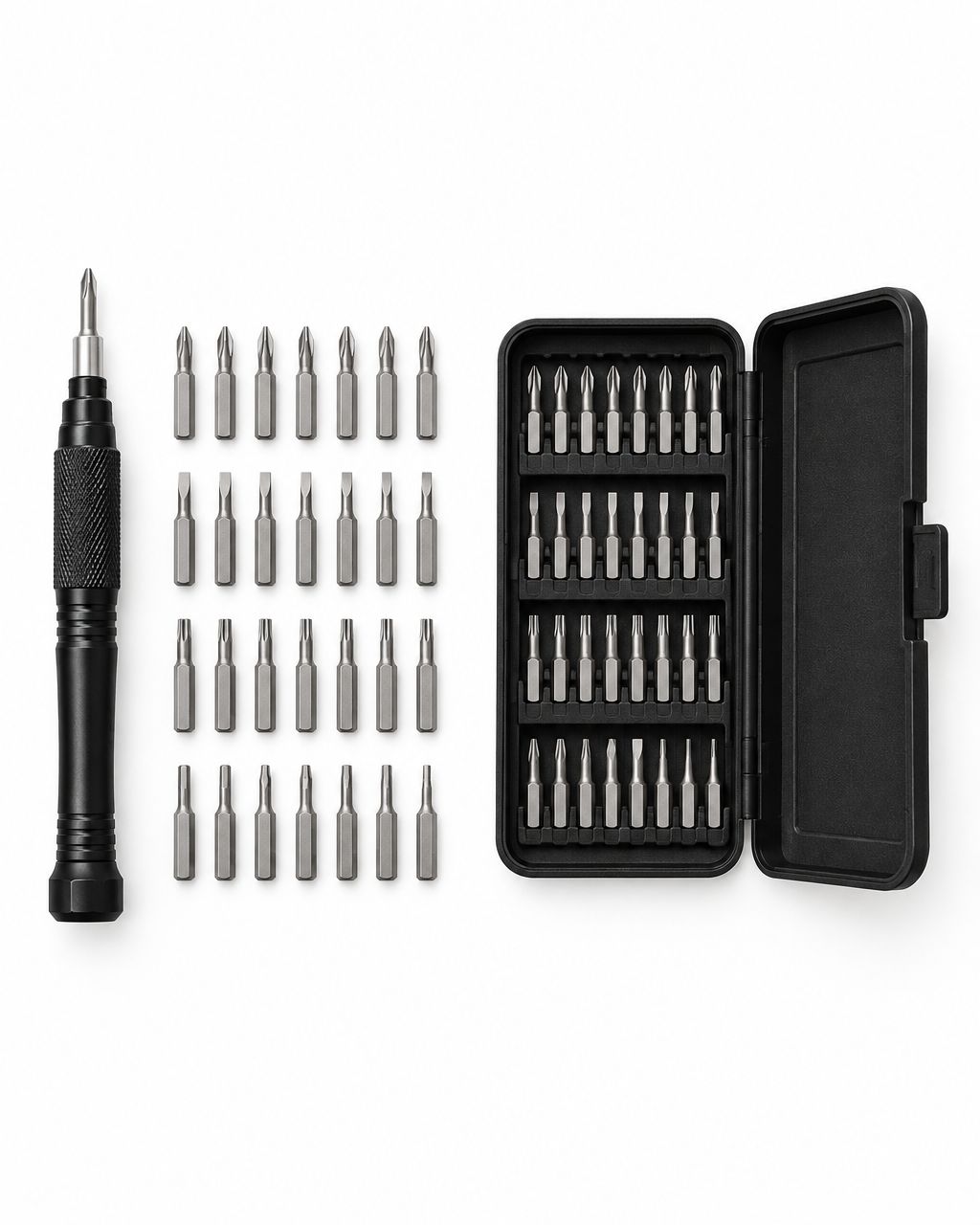
Choose a precision screwdriver set by matching its bit shapes and sizes to the screws you actually need to turn, then checking handle control and storage. For occasional small repairs, start with a manual kit; a bigger piece count does not guarantee a better fit or make a difficult repair safe.
- Choose a precision screwdriver set for screw fit, not the largest piece count.
- A manual driver is a practical starting point for occasional household repairs.
- Check the actual bit list before buying for a specific phone, laptop or controller.
- Nexonamart shoppers should compare listed features with the repair they plan to do.
Why this matters
A loose battery cover looks like a small job until the screwdriver slips. The right tip gives you a better chance of turning the screw without chewing up its head. The wrong one can turn a simple adjustment into an awkward removal problem.
That is the same practical buying approach behind our guide to home gadgets worth buying: start with a problem you already have, rather than collecting tools because the package looks useful. Your repair kit should earn its space in a drawer.
How to choose a precision screwdriver set for everyday repairs
Buy for your first repair, then for the next few jobs you can realistically handle. You do not need every specialty tip to tighten an accessible screw. You do need the exact tip the screw requires.
Use this sequence before comparing kits:
- Identify the item you want to fix and the screw you need to reach.
- Check the screw-head shape and the size required by its repair instructions.
- Compare those requirements with the kit's written bit list.
- Check whether the handle and shaft can reach the screw without obstruction.
- Choose storage that keeps the bits visible and secure.
- Decide whether the repair needs tools or skills beyond a screwdriver.
In 2026, a kit photo is still only a starting point. A case full of tips does not prove that the one you need is included, and a familiar-looking screw head does not prove two bits are interchangeable.
Match the screw-head shape first
Phillips, slotted, Torx and other screw heads require different tip shapes. Start with shape before worrying about size. A flat blade is not a general substitute for a cross-shaped tip, even when it seems to catch part of the screw.
Device-specific repair instructions are particularly useful here. They can name a tip that looks similar to something already in your kit but has a different profile. If the instructions call for a particular tool, use that requirement rather than guessing from the photo.
Do not assume every cross-shaped screw takes a Phillips bit. The iFixit guide Choosing the Right Screwdriver Bit, consulted in October 2026, specifically distinguishes Phillips and Japanese Industrial Standard tips. Similar appearance is not a compatibility guarantee.
Check the size, not just the label family
A kit containing Phillips bits is not automatically suitable for every Phillips screw. The size matters too. The tip should seat properly and fill the screw head rather than wobble inside it or sit above it.
For orientation, iFixit's identification guide lists these Phillips tip diameters:
| Marking | Diameter listed in the guide | What the marking tells you |
|---|---|---|
| PH0 | 2.5 mm | Phillips size 0 |
| PH00 | 2 mm | Phillips size 00 |
| PH000 | 1.5 mm | Phillips size 000 |
These figures help explain the labels; they are not a compatibility list for a particular Nexonamart kit. A bit diameter is also not the screw's thread diameter or length. Follow the item's repair guide and check the actual fit before applying force.
Look for a handle you can control
A screwdriver should let you stay aligned with the screw while turning gently. For small work, control matters more than the ability to apply a lot of force. A comfortable grip helps, but comfort is personal.
Inspect the handle shape and how the bit attaches. If a kit description mentions a rotating cap, extension or flexible shaft, consider whether that feature solves a real access problem. Do not treat an accessory as necessary just because another kit includes it.
A broad handle can be comfortable for general tasks yet awkward in a tight recess. A slim shaft can improve access, but it does not make the bit correct for the screw. Evaluate reach and fit separately.
Manual, electric or a regular screwdriver?
For an occasional repair, a manual precision driver is a sensible default. It keeps the turning action under your direct control and does not require charging. That does not make it the right tool for every screw around the house.
| Tool option | Best for | Practical benefit | Main limitation |
|---|---|---|---|
| Manual precision driver | Occasional small-screw work | Direct control over each turn | Repetitive work takes manual effort |
| Electric precision driver | Repeated compatible small-screw tasks | Powered turning reduces repeated hand motions | Requires power and careful control near delicate parts |
| Regular screwdriver | Larger screws that match its tip | A straightforward option for general household work | Its tip or shaft can be too large for small recesses |
Keep a regular screwdriver for jobs that need one. A precision set is an addition to your tools, not a replacement for everything you use on furniture, fixtures or other larger fasteners.
An electric driver deserves consideration when you repeatedly do the same compatible task. Check its instructions, controls and bit compatibility first. For a single repair, buying a powered tool can add complexity without solving the main problem: selecting the correct tip.
What makes one precision screwdriver set more useful than another?
Usefulness comes from the relationship between the kit and your jobs. Compare these factors rather than ranking sets by their largest headline number:
- Bit coverage: The written list includes the shapes and sizes your items require.
- Reach: The shaft and handle can access the screw without rubbing against the surrounding housing.
- Grip: You can keep the driver steady and turn it without an awkward hand position.
- Organization: Each bit has an identifiable place, making missing pieces easier to notice.
- Repair scope: You know whether additional opening tools, replacement parts or professional help are required.
A piece count can include accessories as well as bits. Read what the count represents before using it as a comparison. A kit with more pieces can still leave out the exact tip required by your device.
For a practical 2026 buying decision, write down the screw requirement before opening shopping tabs. That small step makes it easier to compare useful features instead of getting distracted by a crowded case.
Which everyday jobs should you plan for?
Accessible battery covers and small household items
Start with jobs where you can see the screw, identify its shape and understand what opening the cover will expose. A battery compartment can be a useful example, but its screw still needs the proper tip. Follow the item's instructions and remove user-removable batteries when those instructions require it.
Keep the cover and screws together while working. If the cover remains attached after the screw is loosened, check for another fastener or a retaining feature. Do not turn a screwdriver into a pry bar simply because the cover does not lift immediately.
Glasses and delicate adjustments
A tiny screw does not automatically make an adjustment easy. Check whether you can clearly see the screw and whether the bit fits without touching a lens or stressing the frame. Use a stable surface and stop if you cannot maintain alignment.
For a damaged hinge, missing hardware or a frame that needs reshaping, an optician is a better route than experimenting with a screwdriver. The tool should solve an accessible fastening problem, not encourage a repair outside your comfort level.
Phones, laptops and controllers
Treat electronics as model-specific repairs. Different models can require different screw types, opening methods and replacement parts. A screwdriver set alone does not tell you how to disconnect a battery, release a cable or open a sealed housing safely.
Read a repair guide for the exact model before buying tools. If a battery is swollen, damaged or otherwise unsafe, stop and get qualified help. Do not use a screwdriver to push, puncture or flatten a battery.
A general description such as computer maintenance is not proof that a kit supports your laptop. In 2026, model-level compatibility remains a question to answer before opening the device, not after.
How to evaluate Nexonamart's listed set
The 32-in-1 Hardware Tool Combination Screwdriver Set is listed for telecom and computer maintenance. Its product photos show a case, driver, bits and tweezers. The written description does not provide a complete bit-by-bit compatibility list.
That distinction matters. The photos help you understand the layout, but they should not be used to promise compatibility with a specific phone, watch or controller. Check the required tip against confirmed product details before deciding.
Nexonamart's screwdriver set is worth considering for shoppers comparing a general maintenance kit, provided they confirm the required bit fit first. That is a buying condition, not a claim that the set is personally tested or suitable for every repair.
The practical benefit is having the pictured tools grouped in a case. The limitation is that the written listing leaves some compatibility questions unanswered. If your purchase depends on a particular tip, request confirmation instead of treating the 32-in-1 name as the answer.
Checks before you turn the first screw
Prepare the job before trying the tool. Good lighting and a clear surface make it easier to see the screw and keep removed parts together. Read any relevant repair instructions all the way through before starting.
- Confirm the item is powered down and disconnected as its instructions require.
- Seat the correct bit without turning and check that it fits securely.
- Keep the shaft aligned with the screw rather than leaning it sideways.
- Turn gently and stop if the tip slips or the screw head starts to deform.
- Keep different screws separated so they can return to their original positions.
If a screw will not move, pushing harder with a poorly fitting bit is not a repair strategy. Recheck the tip, inspect the head and follow a suitable removal guide. A damaged screw can require a different approach or professional help.
Is a bigger kit always better?
No. A larger kit is better only when its extra tools address jobs you actually expect to do. A smaller set with the correct tips is more useful than a larger one that does not fit your screws.
Do you need magnetic bits?
Magnetic retention can help hold suitable screws during handling, but it does not correct a mismatched tip. Confirm whether a kit actually has the feature and follow the device manufacturer's precautions. Do not assume every precision set is magnetic.
What should you check before buying online in 2026?
Compare the written bit list, product photos and any model-specific requirements. If those sources leave a critical question unanswered, get confirmation before buying. Nexonamart shoppers should use the same standard whether they are comparing a general store or a specialist tool retailer.
FAQ
What's the best precision screwdriver set for a beginner?
The best beginner set is a manual kit with the exact bit shapes and sizes needed for your first repair. Prioritize clear identification, comfortable control and organized storage rather than the largest piece count.
Can I use a regular screwdriver instead of a precision screwdriver?
Use a regular screwdriver when its tip and shaft correctly fit the screw and surrounding space. Switch to a suitable precision driver when the regular tool is too large; never force an oversized tip into a small screw.
Does a 32-in-1 set include 32 screwdriver bits?
Do not assume a 32-in-1 label means 32 separate bits. Read the packing list because kit counts can include accessories, and verify any specific bit your repair needs.
Will one precision screwdriver set fit every laptop?
No, a precision screwdriver set should not be assumed compatible with every laptop. Check a repair guide for the exact model and compare its required tools with the kit's confirmed contents.
How do I know if the screwdriver bit is too small?
A bit that wobbles or does not fill the screw head is a poor fit. Check the correct shape and size before turning, and stop if the tip slips.
Can a precision screwdriver fix a stripped screw?
A standard precision screwdriver does not guarantee removal of a stripped screw. Stop repeated slipping and use a removal method appropriate to the screw, surrounding material and device.
Should I buy an electric precision screwdriver for occasional repairs?
Start with a manual driver for occasional repairs unless powered turning addresses a clear need. An electric driver adds power requirements and does not remove the need for correct bit fit and careful handling.
One last thing
Choose the repair before you choose the kit. Find the exact item, locate its instructions and identify the required tip. When those details are clear, a modest tool purchase can be a useful addition rather than another case that sits unopened in your drawer.